- A vendor claiming passkey support is only a starting baseline. Recovery paths, admin roles, and fallback logins decide real risk.
- Pilot a small group of users before renewal. Test lost phones and departing staff to verify your security policy holds up.
- Passkeys stop credential phishing attacks. They do not replace device hygiene, session timeouts, or clean identity offboarding.
Use this passkey readiness checklist to audit SaaS tools before an annual renewal. Passkeys replace shared passwords with cryptographic key pairs. The FIDO Alliance says 68% of firms now deploy passkeys. Even so, ticking a passwordless box solves very little on its own. You must know how a vendor handles lost phones and departing staff.
Do not drop every password in one rush. CISA advises teams to adopt phishing-resistant authentication first. The UK National Cyber Security Centre confirms that FIDO2 passkeys beat SMS codes. Start your rollout with core admin tools where risks run highest.
The passkey readiness checklist for annual contract renewals
Review these critical areas with your software vendor before signing your contract renewal.
1. Does it work for every account type that matters?
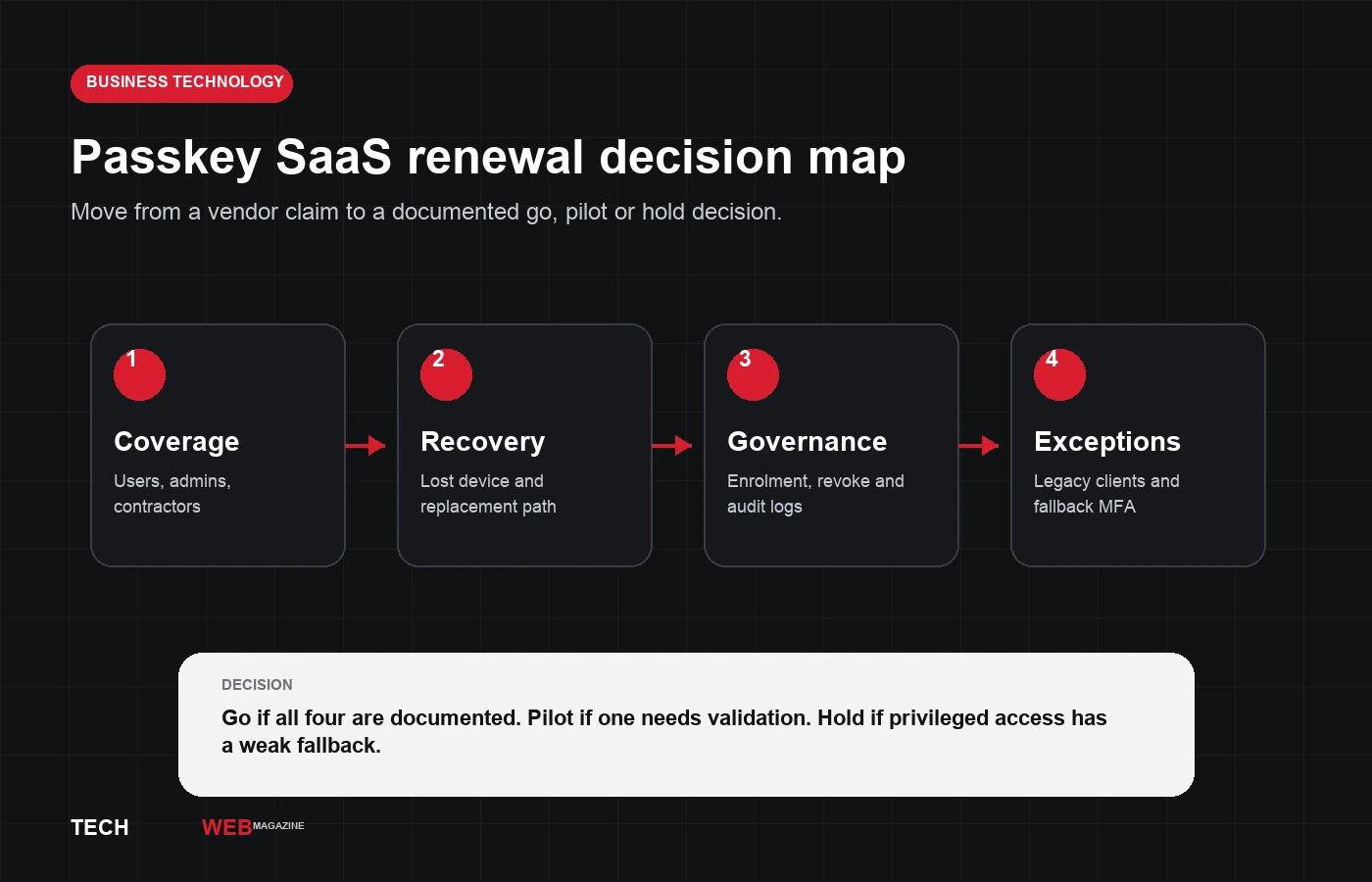
Ask separately about staff, system admins, contractors, and break-glass logins. Many vendors support passkeys for basic users but leave admin consoles on passwords. Audit each account class. Never assume user support protects administrative settings.
2. Which credential choices can your policy support?
Check if the tool supports synced passkeys, hardware keys, or both options. Your device policy guides the right choice. Teams with managed laptops need different controls than remote contractors. Check where keys live before letting users enroll personal devices.
3. What happens when a person loses a device?
Account recovery is where weak setups break down. Ask the vendor for their recovery steps, required proof, and audit logs. Strong keys help little if a help desk resets access with an SMS code. Set clear rules for temporary passes and key re-enrollment.
4. Can an administrator see, revoke and investigate credentials?
IT managers need fast controls when a phone goes missing. Make sure your admin console lists keys, revokes credentials, and logs events. If users manage keys on phones with no admin oversight, risk grows quickly.
5. Can you enforce the policy where the risk is highest?
Optional security settings get skipped by busy teams. Check if you can mandate passkeys for admins and finance apps. The setup flow must follow your device rules and network boundaries. Registration rules require strict oversight alongside sign-in checks.
6. Which paths still rely on passwords or weaker MFA?
Find every legacy door into the software. Look closely at older desktop apps, IMAP email sync, API tokens, and integrations. Finding gaps does not mean dropping the tool. It shows where you need extra safeguards in your stack.
7. What will prove the pilot is ready to expand?
Run a test pilot with standard staff, admins, and remote workers. Test routine logins, device loss, account recovery, and offboarding. Track help-desk tickets and setup speed to gauge real readiness. If recovery needs manual vendor intervention, pause company rollout.
Passkey evaluation matrix for vendor review
| Checklist Area | What to Verify | Pass Criteria | Risk If Missing |
|---|---|---|---|
| Role Coverage | Admin, standard user, contractor logins | Covers all roles including billing and console | Admin console remains open to password leaks |
| Key Architecture | Platform passkeys vs FIDO2 hardware keys | Supports managed hardware and platform keys | Unsupported BYOD devices block corporate policy |
| Recovery Path | Self-service fallback and help-desk workflow | Audit-logged identity verification required | Social engineering bypasses strong cryptography |
| Admin Governance | Central revocation and audit log export | Immediate admin-triggered credential wipe | Stolen laptops retain persistent access |
| Legacy Fallbacks | API tokens, basic auth, mobile endpoints | Documented legacy access controls | Attackers bypass web UI via legacy protocols |
Decision rule for procurement and IT teams
Renew when a vendor proves full role support and fast key revocation. Run a pilot if basic sign-in works but admin logs need testing. Hold the renewal if admin consoles still rely on weak passwords.
Passkeys block phishing by tying keys to site domains. Yet they do not stop malware on infected laptops or stolen cookies. Keep device checks alongside recurring AI access reviews and identity audits. Switching software tools brings hidden operational costs, as noted in our guide to the hidden cost of switching SaaS tools. For server keys, read our guide on Ed25519 vs RSA keys.
Sources and further reading
- CISA: Require multifactor authentication
- UK NCSC: Passkeys are more secure than traditional ways to log in
- FIDO Alliance: State of Passkeys 2026 findings
- Microsoft: What's new in Entra, June 2026
Frequently asked questions
Do passkeys eliminate all account-takeover risk?
No. They prevent phishing attacks, but stolen session tokens and compromised endpoints remain valid threats. Combine passkeys with device security checks and short session lifespans.
Should a small business wait until every SaaS tool supports passkeys?
No. Prioritize identity providers, corporate email, financial accounts, and admin consoles first. Protect remaining services with hardware MFA and strict recovery rules.