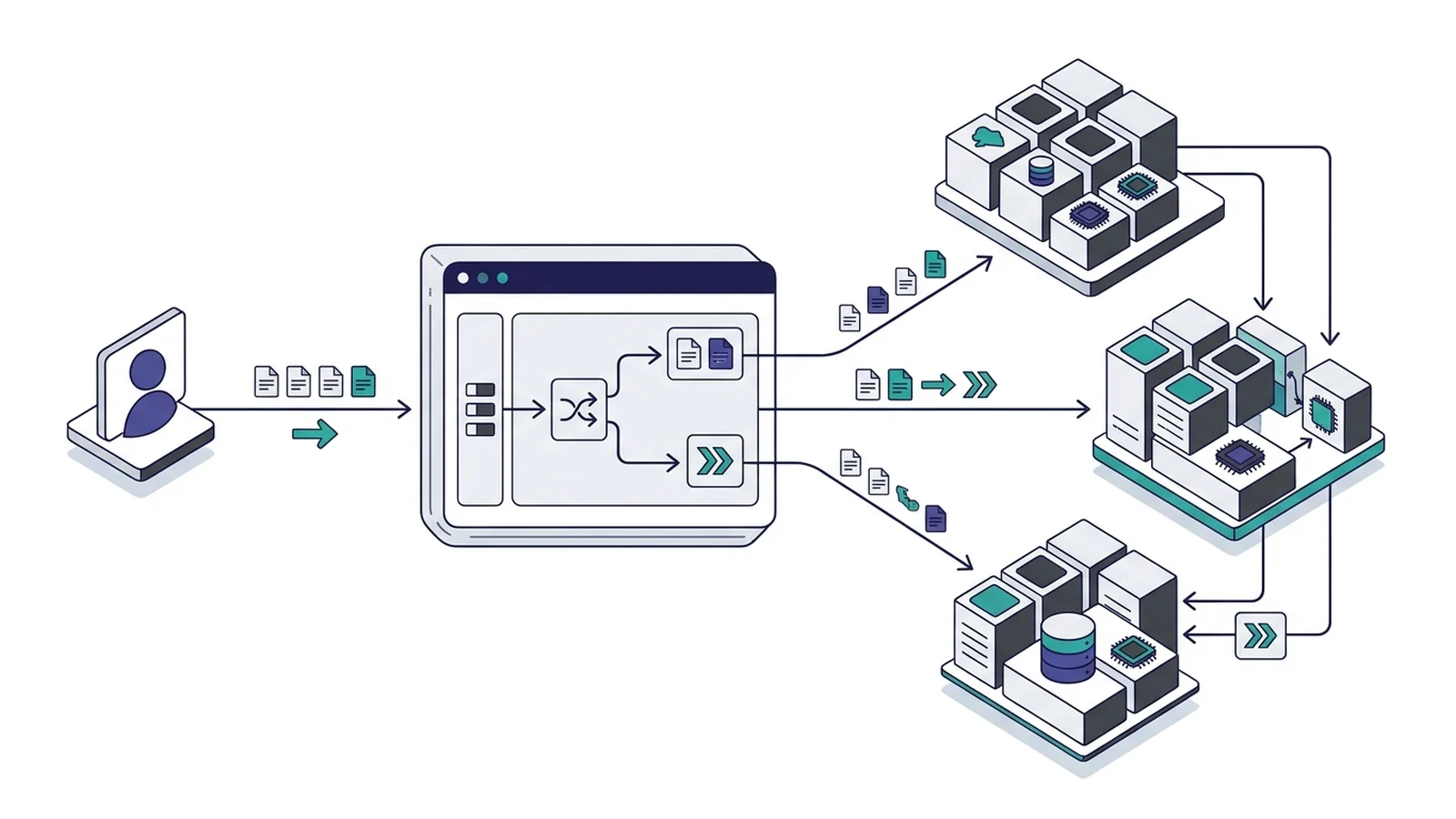
- The proxy passes original authority lines straight to HTTP backends.
- Client domains stay safe in X-Forwarded-Host.
- Version 2.11 changes HTTPS upstream handling.
- Use header_up to override request metadata.
How Caddy handles the domain header by default
By default, the caddy reverse proxy host header pipeline passes client authority lines directly to HTTP upstreams. It automatically populates X-Forwarded-For, X-Forwarded-Proto, and X-Forwarded-Host. When proxying to HTTPS backends in v2.11+, the server sets the upstream target to match the upstream address for TLS ServerName alignment.
Unlike proxies that default to overwriting upstream headers with backend socket addresses, the server passes incoming client domain headers straight through. It keeps the original domain name on each hop without extra setup.
The proxy also adds tracking fields automatically. It sets X-Forwarded-For with the remote client IP. It sets X-Forwarded-Proto with the web scheme. It puts the public domain in X-Forwarded-Host.
| Upstream Protocol | Default Value Sent | X-Forwarded-Host Value | Common Use Case |
|---|---|---|---|
| Plain HTTP | Original client domain | Original client domain | Local containers and services |
| HTTPS (v2.11+) | Upstream target destination | Original client domain | External APIs and cloud endpoints |
| HTTPS (Legacy) | Original client domain | Original client domain | Internal TLS apps |
| Custom header_up | User-set text string | Original client domain | Virtual sites and storage buckets |
Compare this design with our guide on caddy vs nginx reverse proxy setups.
Read our guide on caddy reverse proxy websocket streams.
Using header_up to override the upstream domain header
RFC 9110 rules require an authority header. Without valid authority headers, shared servers and upstream virtual hosts return 404 errors or routing failures.
You can change these values with header_up directly inside your reverse proxy block. The directive updates any selected request field before sending traffic upstream.
app.example.com {
    reverse_proxy 10.0.1.25:8080 {
        header_up Host "internal-api.corp.local"
        header_up X-Real-IP {remote_host}
    }
}
Here, the gateway accepts incoming requests for app.example.com. It swaps the domain for internal-api.corp.local. Writing header_up Host {upstream_hostport} dynamically inserts the target address and port. Engineers can also strip headers with negative rules. Setting header_up -Authorization stops keys from reaching backend code.
HTTPS upstreams and the v2.11 change
Old software releases passed the client domain to HTTPS backends. If the backend cert used a local name, the check failed. An edge proxy sends a server name during the initial handshake. If the certificate does not match the name, the connection drops.
# Modern Caddy behavior (v2.11+)
api.example.com {
    reverse_proxy https://secure-backend.internal:8443
}

# Opting out to retain the original incoming client header
api.example.com {
    reverse_proxy https://secure-backend.internal:8443 {
        header_up Host {hostport}
    }
}
Recent releases resolved this. The proxy sets the upstream name automatically over HTTPS. Both the handshake and the header match. If your app needs the old domain, opt out with header_up Host {hostport}. Running the command-line tool with --change-host-header rewrites the field on the fly.
Virtual hosting and multi-tenant routing pitfalls
Multi-tenant apps share servers across many customers. Code uses the domain name to find database tables and apply branding. A wrong proxy rule can show the wrong tenant data or leak customer records.
Check our guide on caddy reverse proxy docker compose stacks. You can also see our tips for caddy reverse proxy subpath rules.
# Multi-tenant edge routing with distinct domain headers
tenant-a.example.com {
    reverse_proxy 10.0.2.10:3000 {
        header_up Host "tenant-a.internal"
    }
}

tenant-b.example.com {
    reverse_proxy 10.0.2.10:3000 {
        header_up Host "tenant-b.internal"
    }
}
Set clear names for each individual route. This keeps client accounts strictly isolated. Run tests across all custom domain names before going live.
Verification and diagnostic commands
Test early. Never guess what reaches your app server. Use command-line curl tools to inspect live traffic on the wire.
# Test edge proxy response and inspect forwarded headers
curl -Iv https://app.example.com/api/headers

# Send an explicit custom domain header to simulate virtual tenant requests
curl -Iv -H "Host: staging.example.com" https://127.0.0.1:443/

# Verify upstream socket connectivity directly on backend port
curl -Iv -H "Host: internal-api.corp.local" http://10.0.1.25:8080/health
Turn on debug logs in your Caddyfile. Caddy will print every dial step. Output reveals all headers.
Frequently asked questions
Does Caddy pass the original domain header to backends?
Yes. Caddy passes incoming values untouched for HTTP upstreams and records the original domain in X-Forwarded-Host.
How do you override the upstream domain header in Caddy?
Use the header_up directive inside the reverse_proxy block with your target domain or placeholder.
Why did my HTTPS upstream stop working after upgrading Caddy?
Caddy v2.11 sets the upstream destination to match upstream address by default, which may alter backend virtual routing.